

Influencer Affiliate Program
Overview
The Influencer Affiliate Program lets marketing partner with influencers to bring new customers to CASHKR. Each influencer gets their own code and referral link. When a customer orders using that code or link, the customer gets an extra bonus — and every step, from the first click to the completed order, is tracked so you can see exactly how each influencer is performing.
It answers three things for every influencer: how much reach they're bringing (traffic and orders), how well that traffic converts (leads, orders, completions), and what it's costing you (bonuses and commission paid out).
How a Campaign Works
Set up the influencer — Create a code with their name, an optional custom code, the customer bonus you want to offer, and the commission you're paying the influencer.
Send them their code and link — Share it so they can post on Instagram, YouTube, WhatsApp, their own site — anywhere they reach their audience.
Customers start using it — Their followers either tap the link (code applies automatically) or type the code in at checkout on the website or app.
Bonus is locked in — The customer gets their bonus the moment the order is placed. Even if the price changes later, the bonus stays the same.
You track results — Everything shows up in the Influencers dashboard: clicks, leads, orders, conversion rates, and what you owe in bonuses and commission.
Who Does What
Marketing — sets up the code, agrees the bonus and commission with the influencer, shares the code/link, and tracks results.
Influencer — promotes the code/link to their audience, on any platform, with no restrictions.
Customer — uses the code or link to get their bonus when ordering.
Vendor (Ops side) — may revise the order price during fulfillment; this never touches the influencer bonus.
Setting Up an Influencer
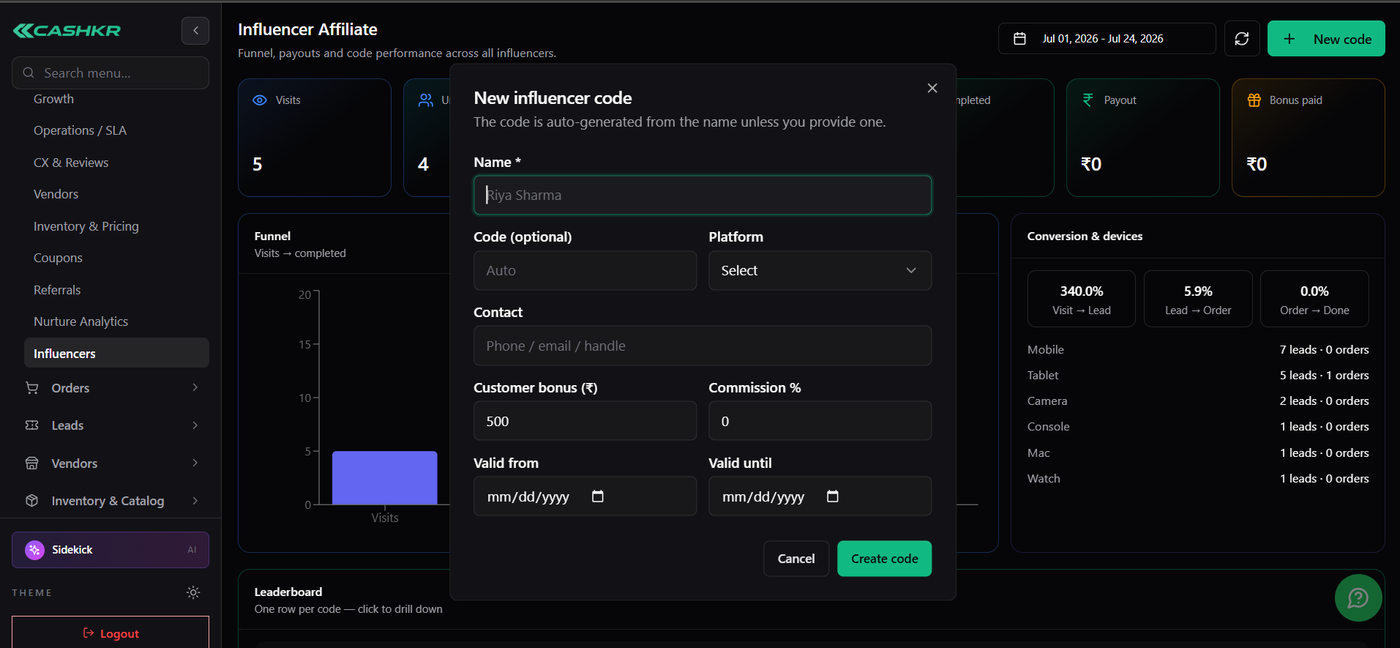
Go to Dashboards → Influencers and click + New code. Enter the influencer's name, optionally their platform and a contact, then set the customer bonus and commission %. Add a start/end date if it's a time-bound campaign, then click Create code — it's ready to share immediately.
If you don't type a custom code, one is generated automatically from the influencer's name (e.g. Sharukh Khan → SHARU20), so every code stays unique.
Two rewards, two purposes:
Customer bonus is the incentive that gets a customer to actually use the code — what makes the offer attractive to their audience.
Commission % is what you pay the influencer for the orders they bring in.
You can run a code with just a bonus and no commission, or vice versa — whatever fits the deal you've made with that influencer.
Sharing the Code
Every influencer gets two things: a code their followers type in manually at checkout, and a referral link that applies the code automatically — easier for social posts, stories, and bios. You can grab either from the influencer's row on the leaderboard (copy icon) or their individual page (Share link button).
Where they post it doesn't matter — Instagram, YouTube, a blog, WhatsApp groups all work. The platform field you set at creation is just a label for your own reference; it doesn't limit sharing.
What the Customer Sees
A customer either taps the influencer's link (code applied automatically) or types the code in manually at checkout, on the website or app. Either way, if the code is valid, they get the bonus right away as part of their order.
Why the Bonus Never Changes Later
Orders sometimes get requoted — the vendor revises the price after the customer places the order (for example, after inspecting the item). Whatever the customer bonus was when the order was placed, that's what they keep, even if the price changes afterward.
This matters for how you talk to customers and influencers: the reward you're advertising is guaranteed, regardless of what happens on the pricing side later.
Reading the Dashboard
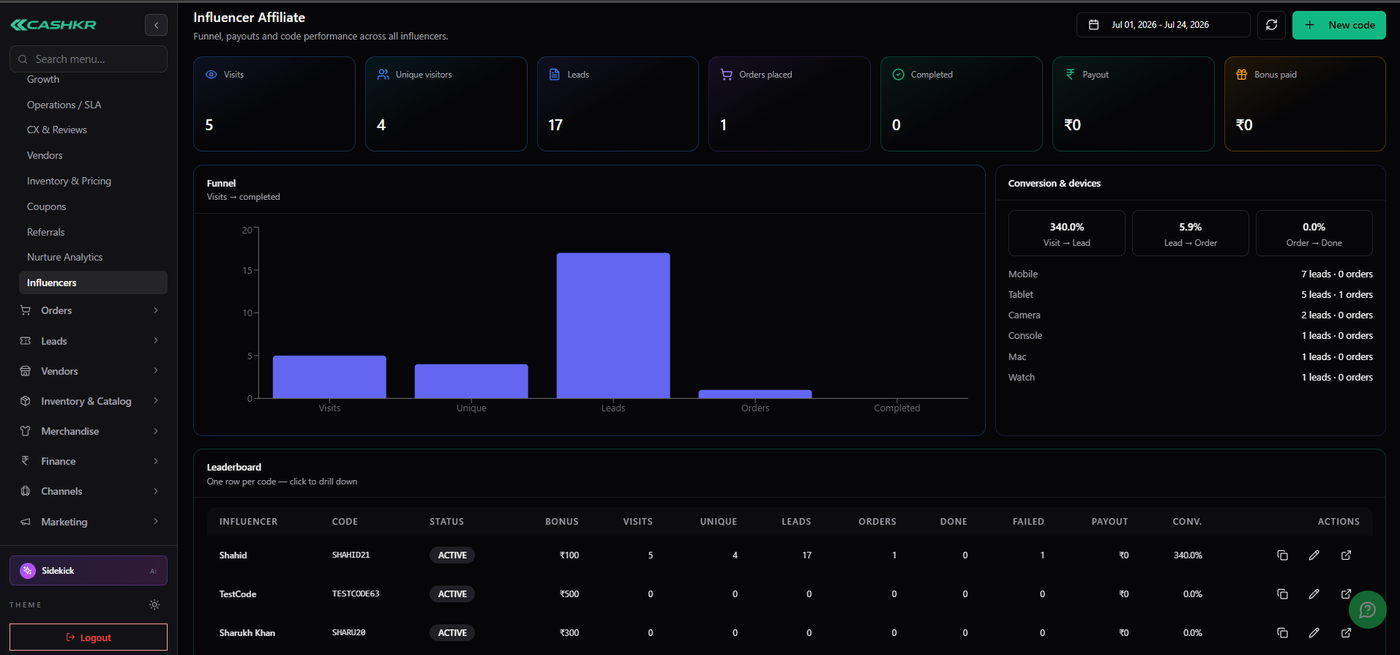
The Influencers dashboard is your main reporting view. Pick a date range at the top and everything below updates for that window.
Top numbers: Visits (total clicks), Unique visitors (distinct people), Leads (real interest shown), Orders placed, Completed orders, Payout (owed to influencers), and Bonus paid (given to customers). This is the set to pull for a monthly or campaign wrap-up.
The funnel shows the journey: Visits → Unique → Leads → Orders → Completed. If you're seeing plenty of clicks and leads but few completed orders, that's a sign the offer is getting attention but something after the click — pricing, checkout friction, fulfillment — needs a look.
Conversion rates: Visit → Lead, Lead → Order, and Order → Done show how well traffic is converting at each stage. You'll also see whether traffic is mostly mobile or tablet, useful for deciding where to focus creative or ad spend. Note: Visit → Lead can sometimes read above 100% — that's not an error, since one visitor can generate more than one lead. Read it as "strong interest" rather than a strict percentage.
The leaderboard shows one row per influencer so you can compare performance side by side — visits, leads, orders, conversion, and what each one is owed. Click any row to see that influencer's full story. This is the quickest way to spot your best performer for the period, and who might need a nudge or a better offer.
An Influencer's Individual Page
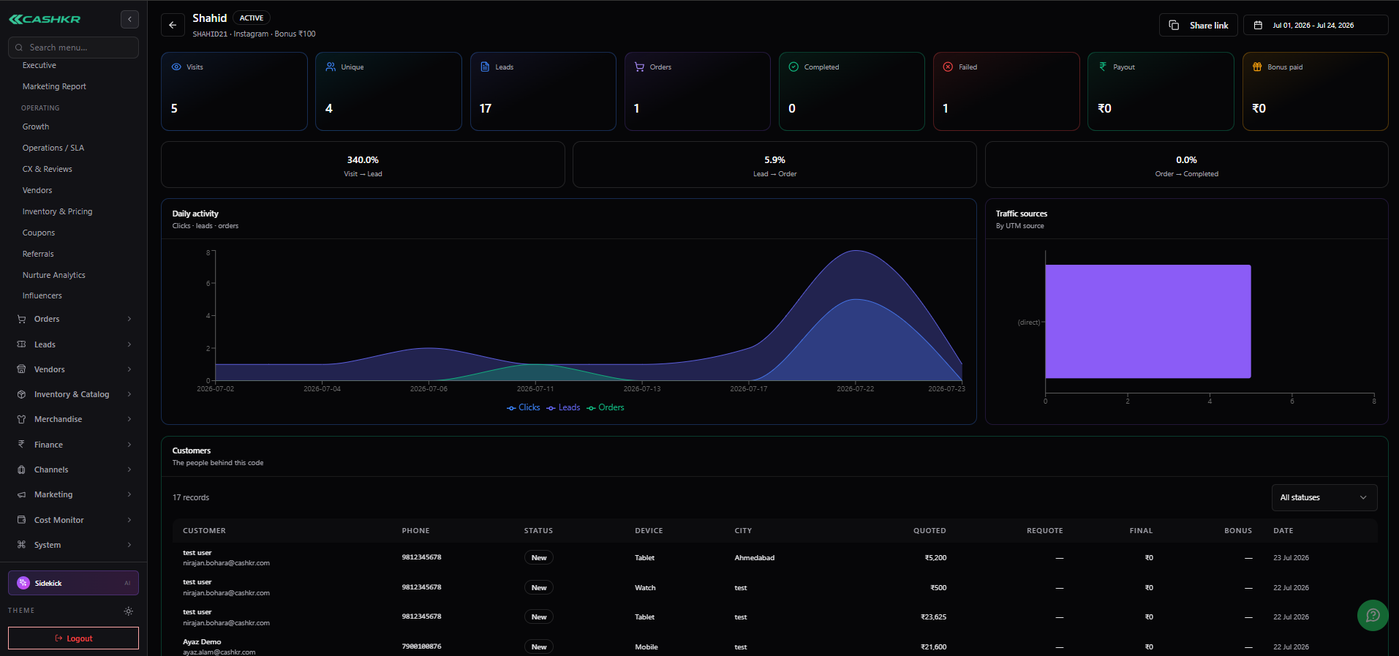
Click into any influencer from the leaderboard to see their full picture: their own numbers (visits, leads, orders, completions, payout, bonus paid), a daily activity chart showing whether a specific post or story caused a spike, where their traffic actually came from, and the list of customers who used their code along with what they ordered.
This is the page to pull up before a check-in call with an influencer, or when deciding whether to renew and how to adjust their terms.
Things to Remember
Bonus is for the customer, commission is for the influencer — either can be zero.
The platform label is just for your notes; it doesn't restrict where an influencer posts.
The bonus is guaranteed — a later price change (requote) never reduces what the customer was promised.
There are two ways to redeem: the link (automatic) or typing the code at checkout.
Set a validity window if a code is only meant to run for a specific campaign.
Everything is date-scoped, so always check your date range before reporting numbers.
Status at a Glance
Code — ACTIVE: live and usable right now.
Code — Inactive/Expired: outside its validity window, or turned off.
Order — InProgress: placed but not yet completed.
Order — Completed: successfully finished.
Order — Failed: didn't go through.